

Discord began as a place where gamers could think out loud together. Plans were made in voice chats. Strategies shifted in real time. Teams reacted instantly, across rooms, cities, and countries. Everything revolved around speed, coordination, and one shared objective.
Years later, business teams found themselves needing the very same things. Last-minute edits in chat. Quick calls to align on decisions. Distributed teams working toward one outcome. Discord quietly moved from the gaming world into startups, SaaS companies, creator businesses, and online education.
So, can Discord be used for business? It already is. But once projects grow and real budgets get involved, another question takes center stage: how does Discord pricing actually work in practice?
In the beginning, Discord feels almost weightless. You create a server, invite people, and start moving. Over time, boosts appear. Then paid bots. File limits. Mobile transaction fees. Subscription cuts. What felt like a free space slowly becomes part of the company’s operating costs.
For teams looking for a more structured and predictable workspace, tools like Chanty offer a calmer alternative. It combines messaging, task management, and voice/video calls in one place, making day-to-day communication and collaboration easier to manage.
Discord Free Plan for business
Discord can be used for business at no cost, making it appealing for startups, small teams, and early-stage communities. You can create servers, organize channels, and communicate through text, voice, and video without any upfront expense.
Features of Discord’s Free Plan
The free plan is surprisingly robust. Teams get access to:
- Unlimited text and voice channels – organize discussions and meetings without restrictions.
- Voice and video calls – quick, real-time communication for decision-making.
- Screen sharing – perfect for presentations, demos, or collaborative editing.
- Basic moderation tools – manage members and enforce rules in small communities.
- Integrations with popular apps – connect with Twitch, YouTube, Spotify, and other platforms.
- File uploads up to 10MB – share essential documents and images with team members.
Advantages for businesses
From a business perspective, the free plan has clear benefits:
- Zero upfront cost for early-stage projects
- Fast setup – start collaborating instantly
- Flexible communication for both synchronous and asynchronous work
- Test community engagement before investing in paid features
Limitations to keep in mind
Of course, there are constraints that grow more visible as teams scale:
- File upload limits – 10MB per file may be restrictive for media-heavy projects.
- Limited server customization – branding, banners, and custom roles are minimal.
- Basic moderation and automation – advanced bots and workflow automations require paid plans.
- No enhanced streaming or higher quality video – only available with Nitro subscriptions.
In short, Discord’s free plan provides a low-risk way to experiment, helping teams of all sizes understand its value before investing. But for real-world usage – especially at scale – optional paid features usually become part of the cost equation.
Discord paid plans explained
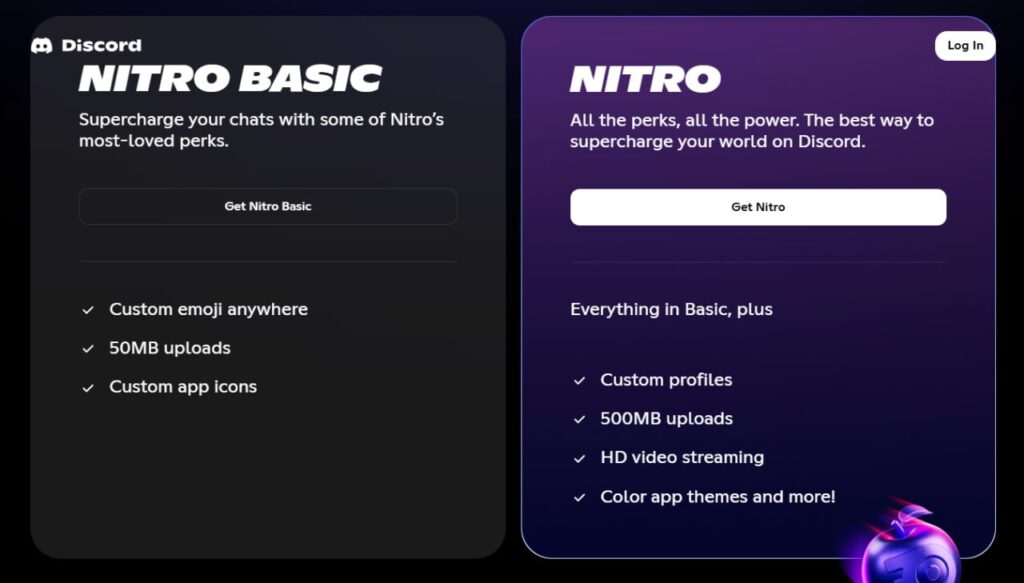
Discord pricing
As teams grow, the free plan can start feeling limited. Discord currently offers two paid subscription tiers – Nitro Basic and Nitro – along with optional Server Boosts to unlock higher file limits, better audio/video quality, and deeper customization. Understanding how these pricing layers work is essential for businesses that want to avoid unexpected costs as usage scales.
| Plan | Approx. Cost* | Key Features | Best For |
| Nitro Basic | ≈ $2.99–$3.49 / month (varies by region) | Custom emojis & stickers, larger file uploads (up to 50 MB per file), custom video backgrounds, app-icon customization, “Super-reactions”, etc. | Individuals or small teams needing occasional larger files and some customization |
| Nitro (full plan) | ≈ $9.99 / month (or ~ $99.99/yr) | All Nitro Basic perks, plus 500 MB file upload per file, HD/4K streaming & screen-sharing, 2 free Server Boosts (with discount on extra), custom profile/avatar/banner, longer messages, increased server-join cap, etc. | Freelancers, growing teams, media-heavy workflows, communities needing high-quality sharing and streaming |
| Server Boosts (per-boost, optional) | ≈ $4.99 / mo per boost (discounted to ~$3.49/boost for Nitro subscribers) | When enough boosts accumulate per server: extra emoji/sticker slots, better audio quality, improved streaming/Go Live quality, upload limits for server members (50 MB at Level 2, 100 MB at Level 3), custom server icon/banner/backgrounds, etc. | Communities or teams needing consistent high-quality voice/video, collaborative media sharing, branding/customization |
*Final pricing varies by country, local taxes, and currency conversion.
Quick takeaway for businesses: Nitro Basic and Nitro are individual user subscriptions, while Server Boosts are server-level upgrades. Discord does not use per-seat organizational pricing. Costs grow as you add personal Nitro subscriptions, paid boosts, and third-party tools.
Discord Nitro Basic: Entry-level upgrade for individuals and small teams
Starting price: ≈ $2.99–$3.49/month (Final price may vary by country due to VAT, local taxes, and currency conversion.)
Nitro Basic is Discord’s most lightweight paid plan. It focuses on removing basic file-sharing limitations and giving users more expressive tools, without changing overall server performance.
What’s included in Nitro Classic
- File uploads up to 50 MB per file
- Use of custom emojis and stickers across all servers
- Custom video backgrounds
- App icon customization
- Super reactions
- Basic profile enhancements
These benefits apply only to the individual user account, not to the entire server.
Business value of Nitro Basic
For businesses, Nitro Basic works best as a personal productivity upgrade, rather than a full team solution:
- Helpful for employees who regularly share presentations, short videos, or design drafts.
- Improves internal communication through richer visual expression.
- Low monthly cost makes it easy to approve for individual contributors.
Limitations for business use
- No server boosts included – so it does not improve audio, video, or overall server quality.
- No advanced streaming features for team meetings or webinars.
- No impact on automation or moderation – paid bots remain an extra expense.
- Still requires paid bots for workflows
Best suited for: freelancers, solo founders, and small teams that mainly need higher file limits without investing in community-level upgrades.
Discord Nitro (Full Plan): Premium features for growing teams and communities
Starting price: $9.99/month or $99.99/year
(Pricing may differ by region, payment method, and local taxes.)
Full Discord Nitro is the top-tier personal subscription designed for intensive communication, large file sharing, and high-quality streaming.
What’s included in Full Nitro
- Everything from Nitro Basic
- File uploads up to 500 MB per file
- High-quality screen sharing and streaming (up to 4K/60fps where supported)
- Two Server Boosts included
- Custom profile, animated avatar, and banner
- Higher message length limits
- Increased server-join capacity
Unlike Nitro Basic, this plan improves both personal productivity and server-level performance through included boosts.
Business value of Full Nitro
Full Nitro becomes valuable when communication intensity increases:
- High-quality screen sharing improves remote meetings, product demos, and trainings
- Included server boosts unlock better voice quality and branding tools
- Large file uploads reduce dependence on Google Drive or cloud storage for everyday sharing
- Supports more professional-looking communities and internal collaboration
Limitations to consider
- Boosts apply only to specific servers
- Additional boosts must be purchased separately
- Workflow automation, analytics, and moderation still depend on paid third-party bots
- Costs grow with team size because Nitro is billed per user
Best suited for: medium-sized teams, creator businesses, Web3 projects, and fast-growing communities that depend on high-quality real-time communication.
Server Boosting: The hidden layer of Discord pricing for businesses
Server Boosts are often the most underestimated cost in professional Discord use. At first, they look like cosmetic upgrades. In practice, they quietly become part of the operational budget for teams that rely on high-quality communication and community engagement.
Price per boost: $4.99/month
(Nitro users receive discounts and 2 free boosts.)
A Server Boost is applied to a specific server – not to a user account. This means that once a business runs multiple active servers, boost-related costs can multiply quickly.
What Server Boosts actually unlock
| Boost level | Required Boosts | What it unlocks | Business value |
| Level 1 | 2 | Higher audio quality, more emoji slots, server banner, improved Go Live streaming | Better voice quality for meetings and basic branding |
| Level 2 | 7 | Higher audio bitrate, 50 MB server-wide upload limit, custom invite backgrounds, better streaming | Stronger support for training, onboarding, and media sharing |
| Level 3 | 14 | Maximum audio quality, 100 MB server-wide uploads, full branding assets, top-tier streaming | Professional-grade events, webinars, and large communities |
Do Server Boosts unlock must-have business features?
Strictly speaking, no core communication function is locked behind boosts. Even without them, teams can still:
- Chat
- Make voice and video calls
- Share screens
- Organize channels
- Run open or private communities
However, boosts reduce friction in three areas that directly affect professional work:
- Audio and video quality for trainings, webinars, and client interaction
- Brand presentation for customer-facing or paid communities
- File-sharing capacity for media-heavy collaboration
So while boosts are not technically mandatory, they become practically necessary once Discord is used for revenue-generating, educational, or client-facing purposes.
Hidden costs of Discord for teams
Discord often feels free at the start. You create a server, invite people, set up channels, and begin working. But as usage grows, many businesses discover that their real costs don’t come from a single subscription – they come from layers of small add-ons that quietly stack over time.
These hidden costs usually fall into four main areas: bots, storage, administration, and monetization fees.
1. Paid bots and automation tools
Many of the workflows businesses expect from professional collaboration tools are not built into Discord. Instead, they rely on third-party bots – and the most useful ones are rarely free at scale.
Common paid bot use cases include:
- Automated onboarding and role assignment
- CRM-style user tracking
- Support ticket systems
- Scheduling and reminders
- Advanced moderation and anti-spam protection
- Payment and subscription management
Typical cost range:
- $5–$25 per bot per month for most premium bots
- Advanced moderation, analytics, or payment bots: $30–$100+ per month
- Custom-built bots: $300–$3,000+ one-time, plus hosting and maintenance
Discord itself does not charge for bots — all these costs come from third-party developers and hosting providers.
2. Storage, file sharing, and media hosting
Discord is not designed to be a document repository. File limits push teams toward paid upgrades or external storage.
File upload limits:
- Free: 10MB per file
- Nitro Basic: 50MB per file
- Nitro: 500MB per file
- Boosted servers: Server-wide upload limits increase to 50 MB (Level 2) and 100 MB (Level 3) for non-Nitro users
Once teams start sharing:
- Recorded meetings
- Training videos
- Marketing assets
- Design files
They often rely on Google Drive, Dropbox, or cloud hosting, adding another layer of monthly cost.
3. Administrative and moderation labor
This is one of the least obvious but often most expensive hidden costs.
Large servers require:
- Dedicated moderators
- Community managers
- Technical admins for bot maintenance
- Security oversight for permissions and access
Unlike enterprise collaboration tools, Discord offers limited native audit logs, compliance tools, and permission reporting. This increases manual oversight and operational complexity.
Result for businesses:
- More internal labor hours
- More operational risk
- Higher reliance on human moderation instead of built-in safeguards
These are not visible “line-item” costs – but they directly affect payroll and management overhead.
4. Monetization and transaction fees
For businesses that sell:
- Subscriptions
- Access to paid communities
- Educational programs
- Digital memberships
Discord monetization tools introduce platform and payment processing fees.
These typically include:
- A percentage of each transaction
- Payment processor fees (Stripe, PayPal, etc.)
- Regional tax handling and VAT
Business consequence: Revenue grows – but net profit shrinks slightly with every transaction, and forecasting becomes harder when multiple fee layers apply.
Real-world cost stack example (Mid-size community)
Here’s how Discord expenses can quietly accumulate for a growing business:
| Cost source | Monthly estimate |
| 10 Nitro users | ~$100 |
| 8 Server Boosts | ~$40 |
| 2 Paid Bots | ~$30–$80 |
| Cloud Storage | ~$20–$50 |
| Moderation/Admin Labor | Variable (often far higher than software costs) |
- What started as “free” can realistically turn into $200–$300+ per month, before labor costs are even counted.
When does Discord stop being cost-effective for business?
Discord is almost always cost-effective at the beginning. For small teams, it often feels like a gift: no licenses, no contracts, no onboarding friction. But as soon as a business grows beyond casual collaboration, the financial equation starts to change.
The turning point rarely comes from a single upgrade. It usually appears when several small costs begin to overlap.
The first cost-effectiveness threshold: 10–15 active users
At this stage, teams typically begin adding:
- A few Nitro or Nitro Basic subscriptions for higher file uploads and better screen sharing
- One or two paid bots for moderation, onboarding, or light automation
- Basic server boosts to improve voice and streaming quality
Individually, these expenses feel minor. Together, they form the first stable monthly Discord budget. For many startups, this is still acceptable – but Discord is no longer “free.”
Discord remains cost-effective here if:
- Only a small portion of users need Nitro
- Bots are limited in number and scope
- The server does not yet require heavy moderation or branding
The second threshold: 25–40 users
This is where Discord starts to lose its financial simplicity.
Teams typically need:
- Multiple Nitro subscriptions across managers, trainers, or content creators
- Several server boosts to support stable meetings, onboarding sessions, or internal training
- Paid automation bots for access control, support tickets, and role management
- External cloud storage for shared files and media
- At least part-time community or system administration
At this point, the combined monthly cost of: Personal Nitro plans, Server boosts, Bot subscriptions, External storage – often approaches or matches the price of dedicated business communication tools. All of this, while Discord still lacks built-in task management, structured workflows, audit logs, and compliance controls.
Discord can still make sense here for:
- Community-first businesses
- Creator economies
- Web3 or education platforms
But it becomes less efficient as a core internal workspace.
The Enterprise threshold: 50+ users and client-facing work
For large teams or client communities, Discord becomes:
- Harder to manage at scale
- Harder to audit for permissions and access
- Harder to forecast financially
Costs rise through:
- Ongoing and expanding server boosts
- Multiple premium bots for automation, moderation, payments, and analytics
- Increased moderation and admin labor
- Security and permission risks
- Revenue transaction and payment processing fees for paid communities or memberships
At this level, Discord’s expenses become fragmented and difficult to predict, because costs are spread across users, servers, bots, and third-party services.
This is usually the point where Discord stops being cost-effective as a primary business workspace, even though it may remain highly valuable for:
- Community engagement
- Marketing groups
- Education hubs
- Public user ecosystems
Chanty as a business-first alternative to Discord
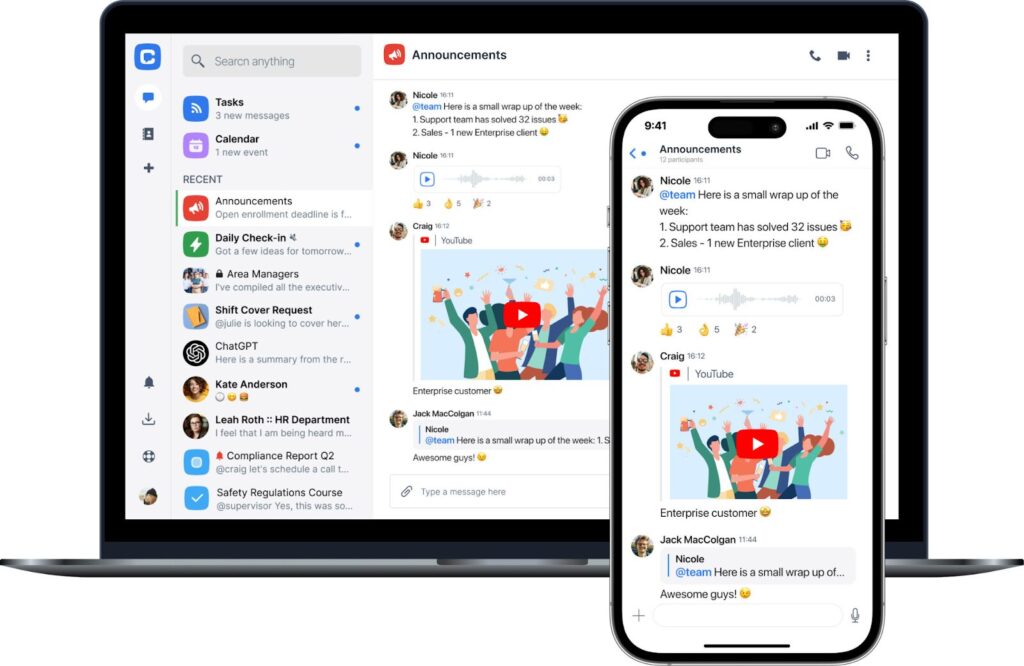
Chanty’s interface
For teams that need structure, predictable costs, and integrated tools, Chanty offers a business-focused, all-in-one workspace. Unlike Discord, with its layered costs through Nitro subscriptions, Server Boosts, paid bots, and external storage, Chanty follows a transparent per-user pricing model with no hidden add-ons.
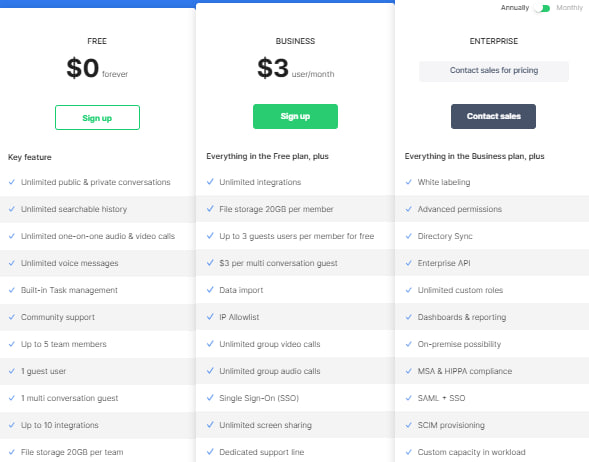
Chanty pricing plans screenshot showing Free, Business, and Enterprise plans with per-user pricing
Chanty offers three clear plans – Free, Business, and Enterprise – all with predictable per-user pricing and all core features included. Teams don’t need to calculate:
With Chanty, teams don’t have to calculate:
- How many boosts a server needs
- Which users require paid subscriptions
- Which bots must be upgraded to premium
- How much external storage will cost next month
Instead, all core collaboration features are included in predictable plans. This makes budgeting easier, forecasting more accurate, and long-term costs far more stable compared to Discord’s stacked expense model.
Chanty’s core features for teams
- Unlimited messaging for one-on-one and group communication
- High-quality voice & video calls, plus screen sharing
- Built-in task manager and Kanban boards for project tracking
- Calendar for scheduling meetings, deadlines, and team events
- File sharing and access control for structured team management
- Integrations with essential business tools
All features are available in one workspace – no need for multiple subscriptions, paid bots, or external trackers
What makes Chanty more practical for daily business use
From a business perspective, Chanty removes many of the operational gaps teams experience with Discord:
- Native task & project management – no bots required
- Business-grade meetings & calls – not community-oriented
- Structured scheduling & client communication – projects and deadlines stay organized
This turns Chanty into a single source of truth for communication, tasks, and scheduling, rather than just a messaging platform.
The key difference
- Discord is excellent for interaction and community engagement.
- Chanty is optimized for execution, planning, and team productivity.
For businesses that need more than just chat – including task control, scheduling, and real client calling – Chanty delivers a far more complete operational workspace.
Final verdict: Is Discord worth the price for business in 2026?
Discord remains a strong choice for teams that need fast, flexible communication. It works well for creator communities, gaming-adjacent startups, Web3 projects, and public or semi-public user groups. For these scenarios, Discord pricing still offers one of the lowest entry points, making it easy to start without a large budget.
But for structured business collaboration, the picture looks different. Discord works best when your focus is community-first interaction, voice communication is key, task management is minimal, and budget predictability isn’t critical.
As teams grow and workflows require more clarity, tasks, and accountability, Discord can become less cost-effective. The need for Nitro subscriptions, server boosts, paid bots, and external storage adds layers of expense and complexity that make financial planning challenging.
For businesses that need a predictable, all-in-one workspace, Chanty offers a better alternative. Messaging, task management, high-quality voice and video calls, and file sharing are included in a single plan, reducing hidden costs and simplifying daily operations. Give Chanty a try and book a demo today to see how it can streamline your team’s collaboration.
FAQ
- Is Discord really free for business use?
Yes. Businesses can use Discord’s core features for free. However, most professional teams eventually pay for Nitro, boosts, bots, or external services.
- Do all team members need Discord Nitro?
No. Nitro is optional and applied per user. Many teams operate with only a few Nitro users – usually managers, trainers, or media-heavy contributors.
- How many Server Boosts does a business need?
Small servers may be fine with 2–4 boosts. Training platforms, paid communities, and large teams often require 7–14 boosts for stable performance.
- Is Discord cheaper than Slack or Microsoft Teams?
At the beginning – yes. At scale – not always. Once bots, boosts, and storage are added, Discord’s total cost can match or exceed traditional business tools.
- Can Discord replace project management software?
Not natively. Discord has no built-in task system. Teams rely on bots or external tools, which introduces additional cost and complexity.
- Does Discord charge per user?
No. Discord does not charge organizations per seat. Costs grow through individual Nitro subscriptions, boosts, bots, and third-party services.
- Is Chanty cheaper than Discord for business teams?
For medium and large teams, often yes. Chanty’s flat pricing includes tasks, calls, and collaboration features without add-ons, making long-term costs easier to forecast.