
It’s easy to forget how long Microsoft Teams has been with us – until that familiar message ping, or another notification sound triggering our little corporate PTSD, we’ve all collected over the years.
Launched in 2017 as a simple chat tool, Teams quietly became a constant in offices almost everywhere. And now, as companies reassess their tools for 2026 and beyond, Microsoft Teams pricing is no longer a background setting – it’s part of the strategic conversation.
With over 360 million monthly active users, Teams has become a daily workspace for corporations, startups, schools, and growing teams alike. But new plans, add-ons, and bundles make the pricing landscape tricky.
This guide explains Microsoft Teams pricing in 2026, including plans, limitations, hidden costs, and which option fits different team sizes.
Looking for a simpler, cost-predictable alternative? Tools like Chanty offer chat, video calls, task management, scheduling, and file sharing in a single workspace – helping teams stay aligned without juggling multiple apps.
What are the Microsoft Teams pricing plans in 2026?
Microsoft Teams offers several pricing tiers depending on team size and feature needs.
Microsoft Teams pricing overview
- Teams Free: $0 per user/month
- Teams Essentials: $4 per user/month (annual billing)
- Microsoft 365 Business Basic: $6 per user/month (annual billing)
- Microsoft 365 Business Standard: $12.50 per user/month (annual billing)
These plans range from basic communication tools to full Microsoft 365 productivity suites.
Microsoft Teams plans comparison table
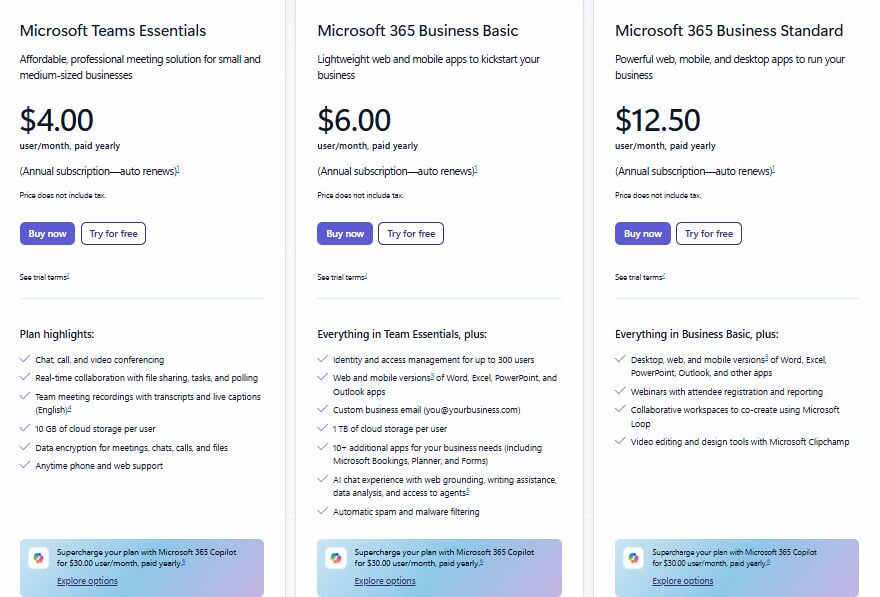
Before diving into costs, let’s take a look at the essentials. Here are the main Teams plans for business and small teams today:
| Plan | Price (per user/month, billed annually) | Key Features |
| Teams Free | $0 | Unlimited chat, video calls up to 60 min, 5 GB/user + 10 GB shared storage, file sharing |
| Teams Essentials | $4 | Unlimited chat, meetings up to 30 hours, 10 GB cloud storage per user, collaboration tools, mobile & desktop access |
| Microsoft 365 Business Basic | $6 | Teams + web versions of Office apps, 1 TB OneDrive storage, email (Exchange), meetings up to 300 participants |
| Microsoft 365 Business Standard | $12.50 | Teams + desktop Office apps, business email, 1 TB OneDrive, SharePoint, advanced collaboration tools |
Microsoft Teams pricing plans overview
Is there a free version of MS Teams , and what are its limitations?
Yes. Microsoft Teams offers a free version designed for small teams and basic use cases.
The free version includes:
- Unlimited chat and messaging with searchable history
- One-to-one and group calls
- Group meetings with up to 100 participants
- Up to 60-minute meeting duration
- Around 5 GB cloud storage per user
- File sharing and screen sharing
- Basic collaboration through web apps
But, like any free offering, it comes with limitations:
- No long meetings beyond 60 minutes
- No meeting recordings
- No advanced admin or security controls
- No phone or PSTN calling
- Limited scalability for growing organizations
If you’re a freelancer, a tiny startup, or testing out collaboration tools – free Teams can work as a solid basic setup: chat, occasional calls, some file sharing.
Once your team starts meeting more often, sharing more files, or working with external partners, the free version quickly shows its limits. This is exactly where Teams Essentials enters the picture.
What is Microsoft Teams Essentials?
Microsoft Teams Essentials is the first paid step up from the free version. It’s appealing because it delivers solid capabilities for a modest price.
At $4.00 per user per month (paid annually), Essentials offers:
- Online meetings (video or audio) with up to 300 participants
- Meeting sessions lasting up to 30 hours, making long workshops, training sessions, or all-day team calls possible
- 10 GB of cloud storage per user, enough for documents, light file sharing, and basic collaboration
- Unlimited chat (including with guest users), file sharing, and collaboration tools (tasks, polls, sharing) across devices
- Meeting recordings with transcripts, live captions (English), screen sharing, and shared calendar integration (Outlook or Google) for easier scheduling
- 24/7 phone and web support, with encrypted data across meetings, chats, calls, and files – reassuring for small teams that value security
In plain terms: Essentials gives you a full‑featured “work‑together” space. It is often enough if your team – small or mid-size – needs reliable video calls, smooth collaboration, and a unified workspace without the overhead of a full Microsoft 365 license.
Limitations of Teams Essentials
Essentials gives much more than the free version – yet it’s still a mid-tier product. Some limitations or “hidden moments” to keep in mind:
- You won’t get the full range of enterprise-class services such as custom business email, advanced identity/access management, or high-end admin controls
- 10 GB of cloud storage per user can fill up quickly if your team works with large files or media
- Desktop versions of Office apps (Word, Excel, PowerPoint, etc.) are not included, which may be a limitation for heavy offline workflows
Like all subscription plans, licensing is per user, so costs grow as your team expands. It’s worth checking whether every user really needs Essentials, or if a mix of plans could make sense for your organization.
Essentials focuses on better meetings and smoother collaboration, while Business Basic takes the next step by adding email, full cloud storage, and complete office workflows in the same workspace.
What does Microsoft 365 Business Basic include?
Business Basic is a logical next step for teams that need more than chats and occasional calls but do not require full desktop Office apps. As part of Microsoft Teams pricing, it provides a well-rounded package suitable for small and growing businesses. According to Microsoft’s official plan sheet, Business Basic costs $6.00 per user per month, billed annually.
Here’s what the plan includes:
- Full access to Teams: Chat, video and audio calls, group meetings, plus online collaboration tools inherited from lighter tiers, including file sharing, cloud storage, and real-time editing.
- Web and mobile Office apps: Access to Word, Excel, PowerPoint, and Outlook for handling documents, spreadsheets, emails, and basic office tasks without installing desktop versions.
- Professional business email: A mailbox per user with custom domain support, ideal for companies that want branded communication.
- Generous cloud storage: 1 TB per user, a significant step up from the Free or Essentials plans, making it suitable for teams storing multiple documents, sharing large files, or creating a shared drive/archive.
- Additional online tools: Smaller utilities, such as collaboration and scheduling tools, are bundled in the plan to reduce the need for multiple separate apps.
What to watch out for
While Business Basic provides strong value, there are some limitations to consider:
- You only get web and mobile versions of Office apps. Teams needing full desktop apps may find this plan insufficient.
- Costs scale with each user. As your team grows, monthly or annual subscription fees will increase.
- For advanced needs, such as heavy offline document editing, complex admin management, advanced compliance/security, or third-party integrations, Business Basic may feel limited.
- Although storage is generous, teams that collaborate heavily and share many files may need careful management to avoid clutter or hitting limits.
Overall, Business Basic delivers a mini digital office in the cloud, combining chat, file storage, calls, and email in one package.
As teams expand and document workflows become more complex, browser-based tools alone may no longer suffice. This is where Business Standard comes into play, offering desktop Office apps, enhanced collaboration tools, and a full-featured productivity environment.
What does Microsoft 365 Business Standard include?
For many teams, Business Standard is the first complete productivity plan, taking collaboration beyond the basics into a full digital workplace. Under the Microsoft Teams pricing structure, it costs $12.50 per user per month when billed annually.
Here’s what you get:
- Desktop, web, and mobile versions of core Office apps, including Word, Excel, PowerPoint, and Outlook, so your team can work seamlessly across devices.
- Full access to Teams for chat, calls, and video meetings, integrated with email, cloud storage, and collaboration tools.
- 1 TB of cloud storage per user (OneDrive + SharePoint), enough for large file libraries, shared documents, backups, and team collaboration.
- Business-class email with custom domain, including a mailbox per user and shared calendars for professional communication.
- Extra business tools beyond Teams, such as project management utilities, simple video editing/browser-based tools, collaborative workspaces, and a cohesive set of apps for teamwork and content creation.
Trade-offs to keep in mind
While Business Standard offers a lot, it may not meet every need. Here are some points to consider:
- Storage management: Heavy media files from multiple team members can quickly consume storage, so regular housekeeping is recommended.
- Scaling costs: Each user increases your subscription cost. Not all team members may need full desktop apps or storage, so careful license planning is important.
- Unused features: Teams that primarily work in a browser may not utilize the full desktop apps, which means some features may go unused.
Overall, Business Standard transforms Teams into a complete digital workplace. It’s ideal for growing teams that handle serious document workflows and need professional collaboration tools across devices.
Which Microsoft Teams pricing plan is best for small teams?
For small teams, the “sweet spot” often lies with Teams Essentials or Microsoft 365 Business Basic. Essentials gives you the core tools – chat, video/audio calls, group meetings, file sharing, and 10 GB of storage – enough to run most small team workflows without extra cost.
Business Basic adds just a little more: web and mobile Office apps, 1 TB of storage per user, and professional email with a custom domain. It’s a well-rounded package for teams that collaborate heavily online but don’t need the full desktop Office suite.
In short: if your team is tiny, focused on communication, and budget-conscious, Essentials is usually enough. If you need extra storage, email, and cloud-based productivity tools, Business Basic is the safest bet. For most small teams, one of these two plans will cover all needs efficiently – without paying for features you won’t use.
Hidden costs & add-ons in Microsoft Teams pricing plans
On paper, Microsoft Teams pricing looks straightforward. You choose a plan, pay per user, and start working. In reality, many teams find that their monthly bills gradually increase as add-ons and extras become necessary for daily workflows.
Some common hidden costs to watch out for include:
- Telephony: If you want to use Teams as a full business phone system with external calling, phone numbers, and dial-in/out features, you’ll need a separate Teams Phone license. In some regions, additional calling plans are required. What begins as simple meetings often evolves into a need for full phone capabilities, which can add unexpected charges.
- Advanced security, compliance, and device management: Growing teams often require enhanced protection for accounts, devices, and sensitive data. These features usually exist only in higher-tier Microsoft 365 plans or as separate add-ons. Businesses handling client data, contracts, or regulated information may find these upgrades essential.
- Storage limitations: While business plans offer generous cloud storage, teams working with videos, design files, marketing assets, or large project archives can hit practical limits sooner than expected. This may require extra storage, third-party backup tools, or additional integrations, costs that rarely appear in the initial pricing overview.
- License sprawl: Not every employee needs the same level of access. Yet many companies default to giving all users the same plan for simplicity. Over time, this can lead to paying for desktop apps, storage, or advanced features that some team members barely use.
Can you mix different Microsoft Teams plans within one company?
Yes, Microsoft allows mixed licensing, and many companies already do this in practice. Microsoft allows you to assign different Teams and Microsoft 365 plans to different users within the same organization. Everyone works within the same shared environment, including the same Teams workspace, domain, and admin panel, but each employee has the level of access that matches their role.
This flexibility is a quiet advantage of Microsoft Teams pricing. For example, a manager may need Business Standard with full desktop Office apps and advanced tools, while a support specialist or freelancer can work perfectly with Business Basic or Essentials. Everyone stays connected in the same channels and meetings, and the company avoids overpaying for features some users do not need.
However, mixed licensing comes with nuances. Features depend on the user’s individual plan. If one teammate has desktop Office apps while another only has web versions, their experience will differ. The same applies to storage limits, advanced security tools, and admin-level controls. Access is never automatically shared up across plans, so admins need to plan carefully.
Scaling is another consideration. Mixing plans can help optimize costs, but it does not bypass Microsoft’s user caps for business plans. If licenses are assigned carelessly, giving full plans to everyone just in case, costs can quietly grow back to enterprise levels.
Chanty vs Microsoft Teams pricing
If your team wants a predictable, all-in-one workspace, Chanty offers an appealing alternative.
At first glance, Microsoft Teams pricing and Chanty’s plans may seem to serve the same purpose – team communication. In reality, they reflect two very different approaches to how collaboration software is built, packaged, and priced. Microsoft Teams is usually bundled into the broader Microsoft 365 ecosystem. Even when the entry price looks modest, the total cost often grows as teams add phone systems, security, storage, compliance tools, and higher-tier licenses for key users. The structure is flexible, but not always easy to predict.
Chanty takes a simpler, more focused approach. Its three clear plans – Free, Business, and Enterprise – group features around real team needs, without scattering them across multiple bundles. Built-in task management with Kanban, a Calendar for scheduling, and a vast range of third-party integrations allow teams to cover almost any workflow without juggling multiple apps or hidden costs.
Here’s how Chanty compares to Microsoft Teams:
| Feature / Plan | Microsoft Teams | Chanty |
| Pricing (per user/month) | Free, $4 (Essentials), $6 (Business Basic), $12.50 (Business Standard) | Free, $3 (Business), Custom (Enterprise) |
| Included Apps | Teams + Office apps (depends on plan), Email, OneDrive, SharePoint | Chat, Video/Audio Calls, Task Management (Kanban), File Sharing, Built-in Calendar |
| Storage | 5–1,000 GB per user (depends on plan) | 20 GB (Business), Custom for Enterprise |
| Meetings | 60 min–30 hours, up to 300 participants | Unlimited duration, up to 20 participants (Business) |
| Integrations | Microsoft ecosystem, limited third-party apps | Vast range of third-party integrations to cover team workflows |
| Complexity | Deep Microsoft ecosystem, may require IT management | Simple, easy onboarding, one unified workspace |
| Best for | Teams using Microsoft 365 extensively, enterprise setups | Small to mid-size teams wanting simple, full-featured collaboration with flexible integrations |
Microsoft Teams is a strong choice for organizations deeply invested in the Microsoft ecosystem. If your team relies heavily on Outlook, Word, Excel, SharePoint, and centralized IT administration, Teams integrates naturally into that infrastructure.
Chanty, on the other hand, is ideal for teams that want communication, collaboration, and task management all in one place. Its flat, transparent pricing ensures you know what you pay for upfront, while built-in Kanban, Calendar, external calling, and broad third-party integrations give teams the flexibility to manage workflows efficiently without juggling multiple tools.
For teams that prioritize simplicity, cost predictability, and a unified workspace, Chanty often provides a more natural, hassle-free collaboration experience.
Final thoughts on Microsoft Teams pricing for small & growing teams in 2026
Microsoft Teams pricing is not just about picking the cheapest plan. It is about choosing the toolset that matches how your team actually works. Each tier serves a different type of team, and the smartest choice is usually the one that fits your workflow today while scaling naturally as your team grows.
Teams Essentials is ideal for small businesses, startups, or remote-first teams that need reliable meetings, chat, and collaboration without the full Office ecosystem. It works best for teams running frequent calls and client meetings, who want a single workspace for communication and file sharing while keeping infrastructure light and costs under control.
Business Basic is a great fit for small-to-medium teams or fast-growing startups that want a true “digital office” in the cloud. It combines chat, files, calls, email, and cloud storage in one workspace, supports document collaboration through web apps, and keeps licensing predictable without paying for heavyweight desktop software.
Business Standard is the natural next step for teams that rely on desktop Office apps, manage serious document workflows, and need professional email, shared calendars, and a fully unified collaboration environment. This plan is built for companies expecting steady growth and wanting room to scale without jumping straight into enterprise-level plans.
If Microsoft Teams doesn’t happen to be the right fit for your team, we’ve prepared a curated list of worthy Teams alternatives, where you can find solutions that fit your workflow perfectly. And don’t forget about Chanty, your reliable everyday companion for streamlining work processes and keeping your team productive and connected.
Ready to see Chanty in action? Book a demo today and discover how your team can work smarter, not harder.
FAQ
Is Microsoft Teams free for business use?
Yes. The free version includes chat, calls, and limited meetings, but lacks advanced features like recordings and admin controls.
Does Teams Essentials include Office apps?
No. Teams Essentials focuses on meetings, chat, file sharing, and scheduling. It does not include web or desktop versions of Word, Excel, PowerPoint, or Outlook.
Which Microsoft Teams plan includes business email?
Business Basic and Business Standard both include professional email with a custom domain via Microsoft Exchange. Essentials and the Free plan do not.
Can I switch Microsoft Teams plans later?
Yes. You can upgrade or downgrade plans as your team’s needs change. Many companies adjust licenses as they grow, add new departments, or restructure roles.
Is Microsoft Teams Phone included in standard plans?
No. External calling and phone numbers require a separate Teams Phone license and, in many regions, an additional calling plan.