
At 7:45 a.m., a clinic manager has three messages to deal with. Someone needs to cover the front desk. The check-in tablet at another location has stopped working. A clinician has a patient update for the incoming care team.
All three could land in the same group chat. But they don’t necessarily belong there. Each message involves a different decision about who should see it, where it should be handled, and what needs to happen next.
Start by separating staff operations, clinical communication, and patient messaging. A managed staff workspace can handle shift coverage, room changes, policy updates, and equipment requests under your clinic’s approved policies. Keep identifiable patient information only in systems approved for that purpose, with proper access controls and audit records.
This distinction matters when choosing a healthcare messaging app. A tool that makes it easier for employees to coordinate their work doesn’t automatically become an appropriate place to discuss patient care. Before introducing one, decide what your staff will use it for, what information they may share, and which privacy rules apply to those activities.
What belongs in clinic staff chat?
Not every conversation that happens inside a clinic involves patient information. Employees also need to coordinate schedules, report equipment problems, share internal updates, and keep administrative work moving. These are legitimate communication needs, but they still require sensible access controls and clear internal rules.
The following examples can help your team distinguish routine operational messages from information that belongs in a clinical or patient communication system.
| Information to share | Place to share | What to check |
| A shift swap, room closure, or equipment fault with no patient details | An approved internal staff workspace | Limit access to the people who need the update. Assign an owner if it needs follow-up. |
| A staff schedule or internal policy | An approved staff channel or document workspace | A rota can contain employee personal information. Check who needs access and how long the file should be kept. |
| A screenshot of the appointment calendar to explain a scheduling issue | The approved system for handling the appointment information | Names, appointment details, and context can identify patients. If the staffing issue can be explained without patient details, post only that operational summary in staff chat. |
| A medication question, urgent result, or clinical handoff | The clinic’s approved clinical communication and escalation workflow | Follow the clinic’s procedures to reach the responsible clinician and document the information in the patient record, where required. |
| An appointment reminder or a reply to a patient | The clinic’s approved patient communication workflow | Follow the clinic’s rules for channel choice, recipient verification, message content, and documentation. |
A quick test for staff is to ask whether a colleague can act on the message without knowing who the patient is. “Room 2 is unavailable until noon” gives the front desk what it needs. A screenshot of the afternoon schedule can reveal considerably more. Even without a name, an appointment time combined with a location and other details may identify someone.
The same principle applies to documents and attachments. A file that looks like a routine operational update may contain names, appointment details, or other information that shouldn’t be visible to everyone in a staff workspace. When possible, share the operational information employees need rather than forwarding the original document or screenshot.
Does PIPEDA apply to healthcare messaging in Canada?
PIPEDA is Canada’s federal private-sector privacy law. It applies to personal information handled in the course of commercial activities where the Act applies. For a clinic, the answer depends on the organization, the activity, the information involved, and the jurisdiction.
A private practice and a publicly funded hospital can face different obligations. Certain interprovincial and international commercial transactions can also bring PIPEDA into scope. The Office of the Privacy Commissioner of Canada’s guidance on provincial laws and PIPEDA explains how federal and provincial privacy laws interact.
| If you’re evaluating a tool for… | Start by checking… |
| An Ontario clinic handling personal health information | Whether the clinic is a health information custodian under PHIPA and which duties apply to the proposed workflow. |
| A private organization in Alberta, British Columbia, or Québec | Which provincial private-sector law applies to the activity and whether a separate health-sector regime is relevant. |
| A clinic using a vendor across provincial or national borders | Which laws apply to the specific transfer or processing arrangement, and where the vendor stores, backs up, and accesses the information. |
These are starting points for the person responsible for privacy at your clinic, not a substitute for assessing the actual organization and workflow. In Ontario, PHIPA applies to specified health information custodians and governs how they handle personal health information. Other provinces have their own rules, and the legislation that applies can depend on the type of organization and the activity involved.
For example, an Ontario clinic should consider whether it is a health information custodian under the Personal Health Information Protection Act (PHIPA), while an organization operating in Alberta may need to consider both the provincial private-sector privacy framework and the Health Information Act, depending on its role.
The important thing is to review the proposed workflow and vendor arrangement together. A platform’s general claim that it supports PIPEDA compliance doesn’t establish that every use of the platform meets the requirements of PHIPA or another provincial law.
Can clinic staff use WhatsApp, SMS, or email?
The app name alone cannot answer whether a particular use meets applicable privacy requirements. Encryption helps protect message content, but the clinic still needs to understand who can access messages, what happens on personal devices, and how it can enforce its policies.
For example, a messaging app may protect conversations while they are being transmitted, but the clinic may have little control over downloaded files, device backups, former employees’ access, or messages shared with external participants. These practical details matter just as much as the security features listed on a provider’s website.
| Channel | What to check in practice |
| WhatsApp or another personal group chat | Who controls membership? What happens to prior messages, saved files, and backups when someone leaves? Can the clinic enforce its rules across the devices people use? |
| Traditional SMS | Can staff verify the recipient and avoid sending sensitive details to a saved number that may be outdated? What copies remain on personal devices? |
| Can staff verify the address and protect attachments? What happens when a message is forwarded or sent to the wrong person? | |
| Managed staff chat | Can the clinic control accounts and guest access, test offboarding, and set retention policies appropriate to the information and workflow? |
What about WhatsApp and SMS?
Personal messaging applications can be convenient, particularly when employees need to reach colleagues quickly. However, convenience doesn’t necessarily give the organization enough control over communication.
With a personal group chat, for example, a former employee may retain access to conversation history or files on their device. The clinic may also have difficulty enforcing consistent retention rules or determining who has copies of shared information.
Traditional SMS presents different challenges. Messages may remain on personal devices, and the organization may have limited visibility into how they are stored or backed up. Sending a message to an outdated or incorrect number can also expose information to someone who should never have received it.
This doesn’t mean that PIPEDA automatically prohibits these channels. Rather, the clinic needs to assess whether the particular use is appropriate for the sensitivity of the information and the safeguards available.
What about email?
Email is widely used in healthcare, but it also requires careful handling. A strong email security setup won’t prevent an employee from selecting the wrong recipient or forwarding an attachment to an unauthorized person.
Clinics should consider recipient verification, access restrictions, attachment protection, and retention procedures. They should also establish clear rules about which types of information can be sent by email and when another approved system is required.
The Canadian Medical Protective Association discusses confidentiality, professional responsibilities, and practical risks when healthcare professionals text about patient care. Its guidance on texting safely about patient care is useful alongside your clinic’s own policies when reviewing existing messaging habits.
How to evaluate a staff messaging provider
When PIPEDA applies, your organization remains accountable for personal information under its control that a vendor processes on its behalf. Choosing a provider therefore involves more than checking whether it offers encryption or has a privacy statement on its website.
Ask for evidence that covers the plan, configuration, and workflow you’ll actually use. A useful first step is to give each shortlisted provider the same scenario and have them show how it works. For example, ask them to demonstrate what happens when an employee leaves, how a guest can access a conversation, or whether administrators can review relevant activity.
This makes it easier to compare providers based on their actual capabilities rather than broad claims about security and compliance. The Office of the Privacy Commissioner’s guidance on assessing third-party service providers offers further recommendations. The guidance is open for comment through December 4, 2026.
| Evaluate | Ask for evidence |
| Account ownership and offboarding | Suspend a test user. Check what they can still access on mobile and desktop, including existing sessions. Ask separately about files already downloaded to a device. |
| Roles and guest access | Invite a test guest to one conversation. Check whether they can discover other channels, see prior history, or download files. Repeat with a frontline staff account. |
| Activity logs | Request a sample log or export. Verify whether it covers the actions you need to investigate, such as role changes, file downloads, or exports. Ask who can view it and how long it is available. |
| Retention and deletion | Apply a test policy and check what happens to a message, its attachment, and any task linked to it. Ask how deletion applies to exports and backups. |
| Data location and vendor access | Request written details on primary storage, backups, support access, and subprocessors. Confirm which commitments appear in the contract for your plan. |
| Incidents and contract terms | Ask when the vendor will notify your clinic, how it will help investigate, and how you can recover or delete your data when the agreement ends. |
| AI and secondary uses | If the plan includes AI, ask which features can read messages or files, which third parties process the data, what they retain, and whether admins can disable access. |
Does your clinic need Canadian data hosting?
PIPEDA does not impose a blanket Canadian hosting requirement. Provincial rules, contracts, and procurement policies may still change the answer for your clinic.
For example, where Québec’s private-sector privacy law applies, section 17 requires a privacy impact assessment before communicating personal information outside Québec. This means a clinic considering an external messaging provider should assess not only where its primary data is stored, but also where backups, support access, and subcontractor processing may take place.
A US HIPAA Business Associate Agreement serves a different legal purpose. It isn’t a general substitute for Canadian privacy requirements, and PIPEDA doesn’t generally require a document specifically called a BAA. Ask what the vendor can commit to for your Canadian use and which contractual terms cover the data you plan to share.
You can review the relevant requirements in Québec’s Act Respecting the Protection of Personal Information in the Private Sector. For clinics operating in multiple jurisdictions, it’s worth having the privacy lead assess the applicable provincial rules before approving a provider.
Move one staff workflow first
Introducing a new communication platform doesn’t mean every clinic conversation needs to move at once. Starting with a limited operational workflow gives employees time to learn the tool and gives managers a chance to test access, responsibilities, and follow-up procedures before expanding its use.
Pick one location or department and one recurring source of follow-up work. Equipment issues are a good example because they cross shifts and can be tested without patient information.
- Create an operations conversation. Give staff an example of what belongs there, such as “The check-in tablet at the North clinic won’t start. Please use the front desk workstation for now.” Explain that patient details and clinical discussions should remain in their approved systems.
- Assign the next step. Turn the message into a task, give it to the person handling equipment, and set a deadline for an update. Let the next shift check the task status before asking the group for an update. This helps establish a simple habit: messages that require action should have a clear owner.
- Test access before expanding. Check that the right staff can find the conversation and that offboarding and guest restrictions work as intended. Use fictional messages and files for these tests. It’s also worth checking the experience on the devices employees actually use, especially if some staff work across multiple clinic locations.
- Give staff a clear route for mistakes. Tell them whom to contact if patient information lands in the wrong chat, and have the privacy lead assess it under the applicable rules. If the old group contains patient information, ask the privacy lead how to handle any records or copies before exporting or deleting the history. Ontario custodians can start with the provincial regulator’s privacy breach reporting guidance.
At the end of the pilot, ask whether staff across locations know where to post an update, who owns the follow-up, and where to check its status. You can also look at whether fewer operational requests are being repeated across private messages or passed verbally between shifts.
If those answers still live in private messages, adjust the workflow before moving more conversations. The goal isn’t simply to get employees using another app. It’s to make routine coordination easier to follow without blurring the boundaries around sensitive information.
Where Chanty fits
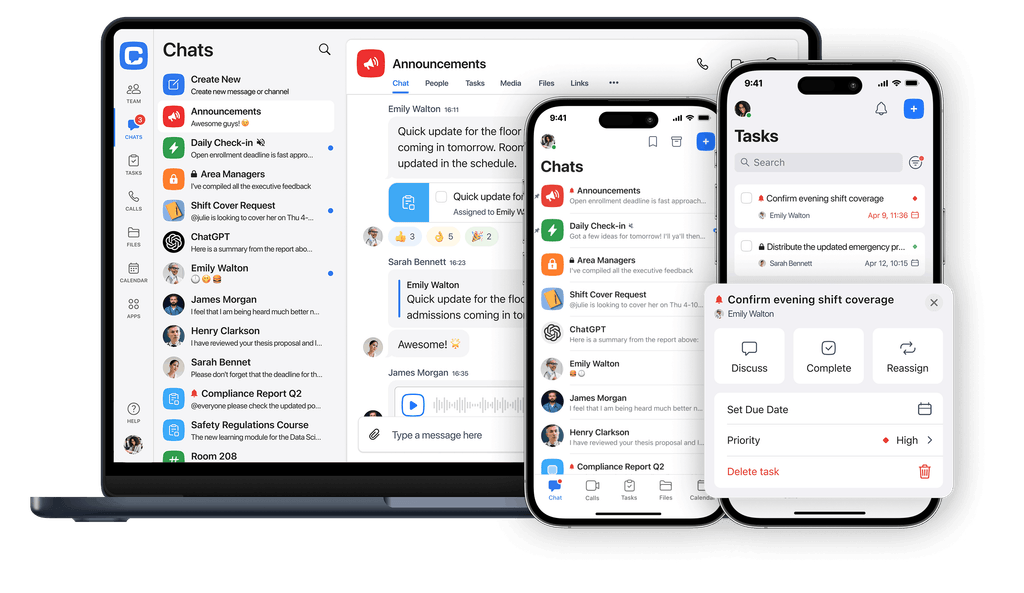
Chanty brings internal staff conversations, calls, files, and tasks into one workspace. For example, a practice manager can turn the check-in tablet message into a task, assign it to the person handling equipment, and set a due date. The incoming team can check its status in the same workspace instead of asking for another update or searching through an old group conversation.
That makes Chanty worth evaluating for equipment requests, shift coverage, site announcements, and other day-to-day clinic operations. These are workflows where employees need to share an update, identify who is responsible, and make sure the next step doesn’t get lost. Learn how to turn a Chanty message into a task.
For a procurement review, it’s important to look at the capabilities available on the specific plan your clinic is considering. Chanty documents configurable retention on Business and Enterprise, and SAML SSO and SCIM on Enterprise. Ask Chanty to confirm audit-log availability, retention, and export options for your plan rather than assuming that every administrative feature is included at every subscription level.
Its public healthcare security and data handling documentation lists US, EU, and APAC residency options for Enterprise. If your organization requires Canadian hosting or has specific contractual requirements, ask for written confirmation before approving any workflow that would involve identifiable patient information.
As with any general team messaging platform, the intended use matters. Keep patient messages, clinical decisions, and clinical handoffs in the systems your clinic has approved for them. Chanty is best evaluated here as an internal coordination workspace, not as a replacement for an EHR, clinical communication system, or patient messaging solution.
Evaluating Chanty for your clinic? Book a demo and bring one staff workflow you want to move out of personal group chats. Ask to see how permissions, offboarding, and task follow-up would work on the plan you’re considering.