
Managing a distributed team involves much more than tracking when employees clock in and out. Businesses need accurate timesheets, productivity visibility, reliable payroll data, and a clear understanding of how employee hours translate into project costs and client revenue.
The challenge is connecting these workflows without creating additional administrative work. When time tracking, scheduling, payroll, and invoicing operate in separate systems, inconsistencies can lead to billing disputes, inaccurate reports, and unnecessary manual reconciliation.
Modern workforce management platforms address these challenges by bringing operational data together.
Here are four workforce management and time tracking solutions worth considering in 2026, each offering a different approach to managing distributed teams.
1. Modge – All-in-One Workforce Analytics and Management
Website: modge.com
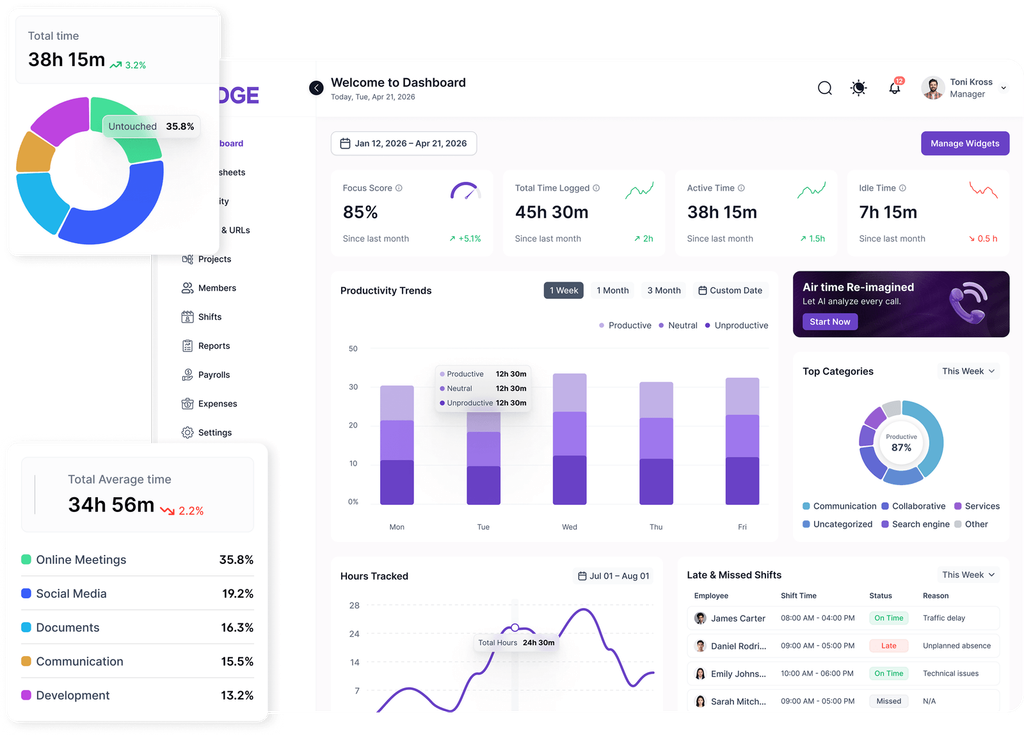
Modge is an all-in-one workforce analytics and management platform designed for distributed teams that need more than a traditional time tracker.
Its approach centers on a single source of truth. A lightweight desktop agent captures worked hours and activity data, which then feeds directly into scheduling, attendance, leave management, payroll-ready timesheets, client invoicing, and profitability reporting.
Instead of collecting employee activity in one application and manually transferring hours into another billing system, Modge connects the entire workflow.
Key Features
Automatic time tracking and workforce visibility
Modge captures working hours, application usage, website activity, and idle periods through its desktop agent. Managers can view real-time activity, understand how time is distributed across projects, and review productivity patterns without relying exclusively on manually completed timesheets.
Scheduling, attendance, and leave management
Shift schedules are connected to actual tracked sessions, allowing managers to identify late arrivals, missed shifts, overtime, and attendance discrepancies. Approved leave is also incorporated into relevant timesheets.
Payroll-ready timesheets
Tracked hours flow into timesheets that can be reviewed and approved before payroll processing. This reduces repetitive data entry and helps maintain consistency between attendance records and compensation calculations.
Automated client invoicing through Stripe
Modge connects billable hours with client invoices. Businesses can configure billing cycles, generate invoices automatically, and collect payments through their own Stripe accounts.
Revenue, cost, and margin analytics
The platform combines billable rates and labor costs to provide financial visibility by client, project, team, and individual employee. This helps businesses identify which projects generate healthy margins and where labor costs require attention.
Suspicious activity detection
Modge also flags unusual patterns, including extended idle periods, mouse-jiggler activity, and work sessions outside scheduled hours.
Teams can review these signals before approving timesheets or finalizing client invoices, adding an extra layer of accountability.
Optional screenshots, configurable privacy settings, and role-based access controls let organizations set monitoring policies appropriate to their teams.
Who Is Modge For?
Modge is particularly relevant for remote-first companies, outsourcing businesses, digital agencies, and service providers that need to connect employee activity with payroll and client billing.
Its main attraction is managing the full operational cycle in one platform, from recorded work sessions to financial reporting.
Consideration: Advanced features such as Stripe client billing and suspicious-activity detection are available on specific paid tiers, so businesses should review the plan comparison before choosing a subscription.
2. Hubstaff – Time Tracking and Workforce Operations
Website: hubstaff.com
Hubstaff is an established time tracking and workforce management platform used by remote teams, agencies, and businesses with employees working across different locations.
It combines project-based time tracking with employee activity data, scheduling, payroll integrations, and client invoicing.
Employees can track time through desktop and mobile applications, while managers can review hours, project progress, and operational reports.
Key Features
- Time and activity tracking: Record hours alongside keyboard and mouse activity levels, with optional screenshots and application usage tracking.
- Project management visibility: Assign time to specific projects and tasks while monitoring budgets and expenses.
- Scheduling and attendance: Manage shifts, working hours, and time-off requests.
- Payroll integrations: Convert approved timesheets into payment data using supported services.
- Client invoicing: Generate invoices based on tracked time and configured billing rates.
- Workforce analytics: Analyze utilization, activity patterns, and resource allocation.
Hubstaff also supports GPS-based tracking, making it relevant for organizations managing both remote computer-based workers and employees operating in the field.
Who Is Hubstaff For?
Hubstaff suits businesses that need a combination of time tracking, employee monitoring, project oversight, and payment workflows.
Its support for desktop, mobile, and location-based tracking makes it relevant to organizations with different working arrangements.
Consideration: Some advanced analytics capabilities are plan-dependent or offered through add-ons. Businesses should also establish clear policies for interpreting activity scores, since keyboard and mouse input alone cannot capture every form of productive work.
3. Time Doctor – Employee Productivity and Workforce Analytics
Website: timedoctor.com
Time Doctor focuses on understanding how employees spend their working hours and helping managers identify opportunities to improve productivity.
The platform combines time tracking, employee activity monitoring, project reporting, and workforce analytics.
It is particularly relevant to organizations that want detailed insight into application usage, workflow efficiency, and time allocation across different teams.
Key Features
Automatic and manual time tracking
Employees can track time against projects, clients, and tasks, with support for different working arrangements.
Application and website usage reports
Managers can review which tools employees use during tracked working hours and identify patterns that may indicate inefficient processes or unnecessary software usage.
Activity monitoring and screenshots
Time Doctor offers activity monitoring, optional screenshots, and screen recording capabilities to provide additional context about work sessions.
Productivity analytics
Reports help organizations understand how employees distribute their time across tasks, projects, and applications.
Attendance and payroll
Time Doctor provides attendance reporting, timesheet approvals, scheduling capabilities, and payroll integrations to support workforce administration.
Its payroll functionality supports exporting data for external payment providers.
Who Is Time Doctor For?
Time Doctor is relevant for distributed organizations, outsourcing teams, and managers looking to understand employee productivity in greater detail.
It can also help companies identify repetitive workflows, overloaded employees, and opportunities to improve resource allocation.
Consideration: Organizations should evaluate which monitoring and analytics capabilities are included in their selected subscription, particularly when considering advanced reporting or screen recording.
4. Harvest – Time Tracking, Client Billing, and Project Profitability
Website: getharvest.com
Harvest takes a different approach to workforce management, concentrating on time tracking, project finances, and client billing.
Rather than emphasizing employee activity monitoring, Harvest helps service-based businesses understand where their working hours go and how those hours affect project profitability.
The platform connects time entries with project budgets, billing rates, expenses, and invoices.
Key Features
Simple time tracking
Employees can record time using timers, timesheets, or connected calendar events.
Project budgets
Businesses can set project budgets and monitor how tracked hours affect project spending.
Client invoicing
Tracked billable hours can be converted into invoices, helping agencies reduce manual billing work.
Expense management
Teams can record expenses, attach receipts, and include billable costs in client invoices.
Profitability reporting
Harvest provides financial reports that compare project revenue with costs, helping businesses evaluate margins and identify projects requiring attention.
Team utilization
Managers can review workload distribution and understand how much team capacity is allocated to billable work.
Profitability reporting is available on Harvest’s Premium plan.
Who Is Harvest For?
Harvest is especially relevant for consulting firms, creative agencies, professional service providers, and other organizations that primarily need time tracking connected to financial management.
It is also an option for teams that prefer straightforward timesheets and billing workflows over detailed desktop activity monitoring.
Consideration: Companies that require continuous activity visibility or suspicious-activity detection should evaluate whether Harvest’s time tracking and reporting approach provides enough operational detail for their requirements.
How to Choose the Right Workforce Management Platform
Although these four products overlap in several areas, they approach workforce management differently.
| Platform | Primary focus | Relevant use case |
|---|---|---|
| Modge | Unified workforce operations and financial analytics | Connecting tracked hours, attendance, payroll-ready timesheets, invoicing, and profitability |
| Hubstaff | Time tracking and workforce operations | Managing distributed and field teams with activity and project tracking |
| Time Doctor | Productivity and workforce analytics | Understanding application usage and employee work patterns |
| Harvest | Time tracking and project finances | Managing billable hours, project budgets, and client invoices |
Before selecting a platform, businesses should consider several practical questions.
Does the organization simply need accurate timesheets, or does it require visibility into actual work sessions? Should tracked hours automatically feed into payroll and invoicing? Is project profitability an important metric? Does the team need scheduling and leave management alongside time tracking?
Privacy and transparency matter as well. Employee monitoring policies should be clearly communicated, and activity metrics should be interpreted in context rather than treated as direct measurements of work quality.
The answers will help determine whether a business needs a dedicated time tracker, a productivity analytics solution, or a more comprehensive workforce management system.
Final Thoughts
Workforce management software is evolving beyond basic clock-in and clock-out functionality. Businesses increasingly need to connect working hours with operational planning, employee administration, client billing, and financial performance.
Modge brings these workflows together through a unified system that connects desktop activity data with scheduling, attendance, payroll-ready timesheets, Stripe invoicing, and profitability reporting.
Hubstaff combines time tracking with workforce operations and support for different working environments. Time Doctor provides detailed productivity and activity analytics, while Harvest concentrates on the relationship between tracked time, project finances, and client billing.
For distributed businesses, the goal is not simply to collect more workforce data. It is to make that data useful: improving operational visibility, reducing administrative work, supporting accurate billing, and helping managers understand the financial impact of how their teams spend their time.