

Every company, whether it has five people or five hundred, develops its own communication maze. Nobody plans it. It grows one reasonable decision at a time: a chat tool here, an email thread there, a spreadsheet someone started “just for now,” a shared drive no one fully trusts. Each piece makes sense alone. Together they form corridors that keep leading back to the same question: where is that decision, and who owns it?
None of this looks dramatic on any single day. But the small losses add up: time spent searching, work coordinated from memory, answers that depend on who happens to be online. The issue isn’t necessarily a lack of communication. Conversations, decisions, and responsibility don’t stay connected.
Internal communication software can help bring that work together. The question is whether it simply gives people another place to talk, or helps them follow through on what they discuss. This post looks at why teams get lost, what a useful workspace should do, and where the thread out begins.
At Chanty, we know this maze from the inside. We’re a small team ourselves, and we’ve spent years building a product for people who get lost in it. What follows comes as much from our own Monday mornings as from our customers’.
What internal communication breaks down as teams grow?
Think of it like a house with a new door added every year. Each door made sense. So now nobody can find the kitchen.
Founders and managers fall victim to it first, and here is how it shows up.
- You become the human router. When context lives in six places, people ask the one person who remembers. Your day fills with “quick questions” that are really retrieval requests: What did we agree with that client? Who’s handling the invoice? Did we ever decide on the new schedule? You are the most expensive search engine in the company.
- Decisions evaporate. A choice is made in a call, echoed in a chat, half-recorded in an email. Three weeks later, two people remember it differently. Nobody lied; the decision just had no home.
- Work slips between conversation and outcome. This is the most expensive leak. Someone says “I’ll take care of it” in a message, and the message scrolls away. No task, no owner, no date. The conversation felt productive, and the work quietly died.
- Noise drowns signal. Notifications arrive constantly, and the urgent hides among the trivial. People either burn out watching everything or mute everything and miss what matters. Either way, you pay for it.
- Access is a guessing game. Who can see which conversation? Is the contractor in a channel they shouldn’t be? Can someone rewrite or delete a message that was part of an agreement? In a small team these questions feel paranoid. After the first incident, they feel overdue.
- Growth multiplies all of it. A team of ten survives on memory and goodwill. A team of thirty discovers that memory doesn’t scale. The maze doesn’t care about headcount; it only gets longer.
The cost isn’t dramatic. Nothing explodes. It’s a slow tax: the hour lost searching, the task done twice, the person who found out late. Founders pay it in the currency they have least of: attention and calm.
What is internal communication software?
Internal communication tools help employees exchange information, discuss work, share resources, and coordinate with colleagues. Depending on the platform, it may also include task management, voice and video calls, integrations, and access controls.
But the number of features isn’t the only thing worth considering. For teams that struggle to follow through on conversations, the more important question is how well the software connects communication with the work that follows.
A useful workspace should help people:
- Find information. Organize conversations by team or project and make past discussions searchable.
- Preserve context. Keep relevant files, links, and decisions accessible alongside the conversations that produced them.
- Assign responsibility. Turn requests and agreements into tasks with clear owners and deadlines.
- Track progress. Make it easier to see what’s underway, what’s finished, and what still needs attention.
- Manage interruptions. Give employees control over notifications and help them distinguish relevant updates from background noise.
- Control access. Provide appropriate permissions for employees, guests, and external collaborators.
These capabilities address different parts of the same problem. Communication makes information available. Coordination helps ensure that the right person knows what to do next. Together, they help employees spend less time chasing context and more time acting on it.
Chanty: the way out of scattered communication
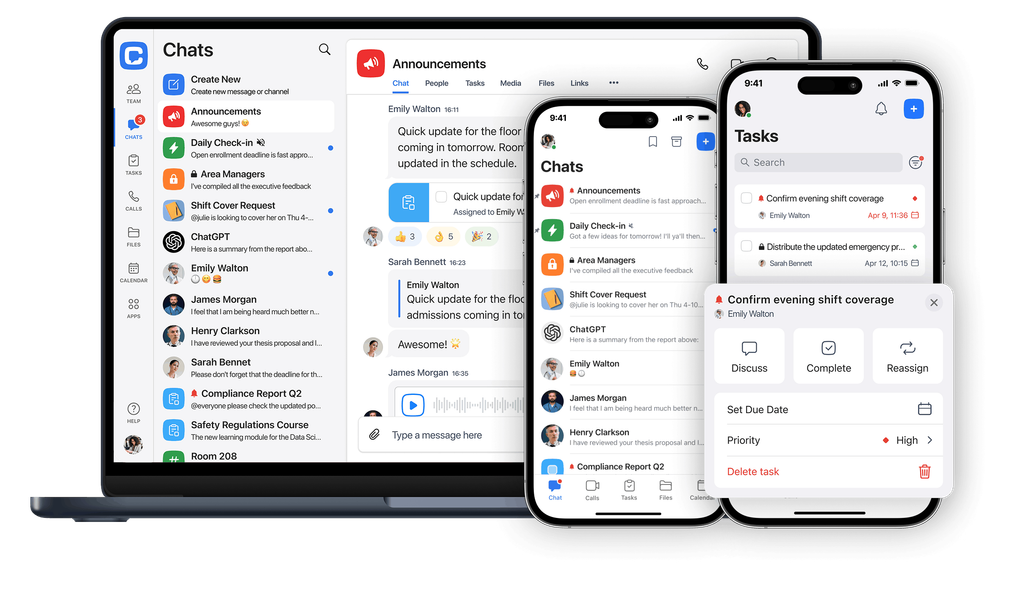
Chanty brings team messaging, task management, Kanban boards, and audio and video calls into one workspace. It’s designed for small and medium-sized teams that want straightforward collaboration without the complexity of a large enterprise platform.
Here is how it supports a team that wants to be swift, productive and safe.
Swift: conversations that explain themselves
- One conversation space, organized by purpose. Channels for teams and projects, direct messages for quick exchanges, threads to keep side discussions from burying the main one. People stop asking where something should be said, because the structure already answers it. For you, that means fewer pings and a company that explains itself.
- Calls without leaving the room. Audio and video calls and screen sharing happen inside the same workspace, so a five-minute conversation doesn’t require another app, another invitation, or another place to lose the outcome.
- Notifications you control. Each person decides what deserves their attention. Quiet where quiet helps, loud where it counts. Calm is a productivity feature, and it starts with letting people protect their focus.
- Language that fits the team. Teams today are rarely monolingual. Chanty’s interface speaks the languages your people actually work in, so everyone participates fully and no one is left decoding.
Productive: conversation that becomes finished work
- Tasks that grow out of conversation. A message turns into a task with an owner and a due date, without copying anything into a separate system. The agreement and the action sit side by side, so “I’ll handle it” becomes something that can be checked. Kanban boards show the state of work at a glance, with no status meeting required.
- Context that stays attached. Files, links, tasks, and decisions live next to the discussion that produced them. When someone joins mid-project, or you return from a week away, the trail is readable instead of reconstructed from memory.
- Integrations that meet your existing tools. Chanty connects to the services your team already uses, including through Zapier, and works with the bots and automations you choose to bring in. Automation handles the routine; human judgment stays where it belongs.
Safe: boundaries you set, a record you can trust
- Safety as a daily habit, not a policy document. Clear structure for who sees what, guest access you decide on rather than hope for, and control over whether messages in a chat can be edited or deleted. When a conversation is part of an agreement, you can protect its record. Safe communication isn’t only about outside threats. It’s also about knowing your own history is intact, and your own people are working inside boundaries you set.
- And under the hood, the basics are covered. Chanty enforces encrypted connections (HTTPS with TLS 1.2 or higher) across its services. A team space is invite-only, and every team’s storage is isolated from the others. Servers run in audited Amazon Web Services data centers, and administrators can remove members directly from the app. Sign-in uses one-time codes rather than passwords, which are harder to steal and reuse. By Chanty’s own policy, nobody has direct database access to read your conversations.
What we learned from running our own maze
We don’t write about this from a distance. Chanty is a small team itself. We coordinate our own work, decisions, and priorities in the same product we build, and we’ve learned the maze the way you do: by getting lost in it.
Many of the features above exist because someone on our team, or one of our users, hit a wall. Kanban boards were added after a user suggested them. Calls came when our own team needed them during the pandemic flare. We never had a large department to absorb the friction, so we built something that removes it.
That same discipline now serves thousands of small and medium teams. They don’t need a platform that demands an administrator, a rollout plan, and a training week. They need to open it on Monday and feel the noise drop by Tuesday.
That’s why Chanty has stayed faithful to one idea: communication should be the simplest thing in your workday.
The simple test for your own team
Ask yourself three questions:
- Can you find any decision your company made last month in under a minute? If not, consider whether conversations and project information are organized in a way that makes them easy to retrieve.
- When someone says “I’ll do it,” does that promise land somewhere visible? If requests routinely remain buried in chats, look for a way to connect discussions with assigned tasks and deadlines.
- Do you know, without checking, who has access to your team’s conversations? If the answer depends on asking around, review your permissions and guest-access practices.
If the answer to any of them is “not really,” you’re in the maze. Your answers can also show where the main friction sits: scattered information, unclear ownership, excessive interruptions or access management. Different problems call for different solutions, so it’s worth finding the source before choosing new software.
If conversations frequently disappear into the background and follow-ups depend on someone’s memory, a shared workspace with built-in task management may help. The way out starts with fewer places, a clearer record, and a quieter day.
That’s the work we do. We’d be glad to be your Ariadne’s red thread in it. Let’s meet at the demo and bring your messiest corridor.